Friday, May 30, 2014

Your Credit/Debit Card Has Been Deactivated

With many banks offering fraud alerts for credit and debit cards, it can be easy to fall for fake versions. Watch out for automated phone calls and text messages that claim your card has been deactivated. It's really an attempt to get you to share banking information.  

How the Scam Works:

You get a text message or automated phone call claiming that your credit, debit or ATM card has been deactivated. Reactivating your card is easy. You just need to call a customer service number and confirm some information. One commonly received message reads: "Your ATM card has been put on hold. Call Customer Department now 1-205-XXX-XXXX."

You dial the number given, and you get an on hold message.  The message to instructs you to enter your 16 digit credit card number. Don't do it. It's a scam! Share your card information, and you will open yourself up to credit card fraud.

Spotting This Scam:

These tips will help you spot and stop scam text messages:  
  • Call your bank or check out their website. Find your bank's phone number on the back of your credit/debit card and call to confirm the status of your card. Don't call the phone number given in the text message.

  • Ignore instructions to text "STOP" or "NO" to prevent future texts. This is a common ploy by scammers to confirm they have a real, active phone number.

  • Forward the texts to 7726 (SPAM on most keypads). This will alert your cellphone carrier to block future texts from those numbers.

  • Be familiar with your bank's communication methods: Did you sign up for text messages alerts? Be aware of how your bank communicates with you, because anything out of the ordinary may be a scam.  

Tuesday, April 1, 2014

Scam Alert -- Don't Click! Malaysian Airlines Teasers are Fakes


Fake Malaysian Airline News Used as Scam Click Bait
The world is eager for news about the missing Malaysian Airlines flight MH370. So eager, in fact, that scammers are taking advantage of our curiosity. Don't fall for click bait teasers promoting exclusive footage of found passengers. It sounds like a sick April Fool's joke, but it's a real scam.
How the Scam Works:   

You are on Facebook, and a post catches your attention. "Video of Malaysia MH370 Plane Found in Bermuda Triangle. Passengers alive," it teases. Another popular version promises: "[NEWS FLASH] Missing Plane Has Been Found!"  

You click the link, thinking it leads to a news site. Instead, you are taken to an unfamiliar, third party website. A pop up may appear prompting you to "update your video player." But when you click "OK," you aren't getting a new software version. You are really downloading malware.


Like all scams, this has many variations. Another common version asks you to take a survey before viewing the video. In the worst case, sharing your information can open you up to identity theft. Even more likely, your information will end up getting sold to spammers.  


This scam is also not to limited Facebook. Watch out for similar links posted on Twitter, through other social media or sent by email.  


Tips to Protect Yourself From "Click Bait" Scams: 

Take the following steps to protect yourself and others from scam links shared through email and social media: 
  • Don't take the bait. Stay away from promotions of "exclusive," "shocking" or "sensational" footage. If it sounds too outlandish (Bermuda Triangle, really?) to be true, it is probably a scam.

  • Hover over a link to see its true destination. Before you click, mouse over the link to see where it will take you. Don't click on links leading to unfamiliar websites.

  • Don't trust your friends' taste online. It might not actually be them "liking" or sharing scam links to photos. Their account may have been hacked. But it may also beclickjacking, a technique that scammers use to trick you into clicking something that you wouldn't otherwise (especially the Facebook "Like" button).

  • On Facebook, report scam posts and other suspicious activity by following these instructions.

  • On Twitter, if another user is sending you links to malware or other spam, report it to Twitter by following these instructions.  

Scam Alert -- Don't Click! Malaysian Airlines Teasers are Fakes


Fake Malaysian Airline News Used as Scam Click Bait
The world is eager for news about the missing Malaysian Airlines flight MH370. So eager, in fact, that scammers are taking advantage of our curiosity. Don't fall for click bait teasers promoting exclusive footage of found passengers. It sounds like a sick April Fool's joke, but it's a real scam.
How the Scam Works:   

You are on Facebook, and a post catches your attention. "Video of Malaysia MH370 Plane Found in Bermuda Triangle. Passengers alive," it teases. Another popular version promises: "[NEWS FLASH] Missing Plane Has Been Found!"  

You click the link, thinking it leads to a news site. Instead, you are taken to an unfamiliar, third party website. A pop up may appear prompting you to "update your video player." But when you click "OK," you aren't getting a new software version. You are really downloading malware.


Like all scams, this has many variations. Another common version asks you to take a survey before viewing the video. In the worst case, sharing your information can open you up to identity theft. Even more likely, your information will end up getting sold to spammers.  


This scam is also not to limited Facebook. Watch out for similar links posted on Twitter, through other social media or sent by email.  


Tips to Protect Yourself From "Click Bait" Scams: 

Take the following steps to protect yourself and others from scam links shared through email and social media: 
  • Don't take the bait. Stay away from promotions of "exclusive," "shocking" or "sensational" footage. If it sounds too outlandish (Bermuda Triangle, really?) to be true, it is probably a scam.

  • Hover over a link to see its true destination. Before you click, mouse over the link to see where it will take you. Don't click on links leading to unfamiliar websites.

  • Don't trust your friends' taste online. It might not actually be them "liking" or sharing scam links to photos. Their account may have been hacked. But it may also beclickjacking, a technique that scammers use to trick you into clicking something that you wouldn't otherwise (especially the Facebook "Like" button).

  • On Facebook, report scam posts and other suspicious activity by following these instructions.

  • On Twitter, if another user is sending you links to malware or other spam, report it to Twitter by following these instructions.  

Friday, March 21, 2014

You're on trial? Watch out for this email scam

Fake Court Summons Emails Carry Malware

Watch out for fake emails informing you that you are being summoned for a court appearance. The file attached to the fake email is actually malware. 
     
How the Scam Works:   
 
You receive an email with the subject line "Urgent court notice." The message says that you are being summoned to appear in court: "Hereby you are notified that you have been scheduled to appear for your hearing." It provides the date, time and location of the trial... but no details.
 
Want to find out why you are being summoned? The email urges you to download the attached "copy of the court notice" to find out. Don't do it! The attachment is malware that will infect your computer.
 
How to spot this scam: 

Courts do not typically summon people via email, text message or phone. Unless you are involved in a case and have opted into receiving email communications, courts normally communicate through mail.

Confirm with the court. If you ever question whether you need to appear in court, call the court system to check. Search for the phone number on the web; don't call a number in the email.

Watch out for variations. A similar scam tells victims that they missed or are being summoned for jury duty.

Ignore calls for immediate action. Scammers try to get you to act before you think by creating a sense of urgency. Don't fall for it.
 

Saturday, February 1, 2014

Scam Alert -- Fooled by a fake funeral notice

Email users are increasingly savvy about spotting scam messages. So scammers are always on the hunt for new ways to evade the "delete" button. This scam email, disguised as a funeral notification, reaches a new low.


How the Scam Works:  


You receive an email with the subject line "funeral notification." The message appears to be from a funeral home in Texas, but it could be from anywhere. The email invites you of an upcoming "celebration of your friends life service." The email looks real. It uses the business's actual colors and logo.


The email instructs you to click a link to view the invitation and "more detailed information about the farewell ceremony." But instead of pointing to the funeral home's website, it sends you to a foreign domain. Scammers place malware on these third party websites that downloads to your computer, giving scammers access to information on your machine.


As usual, watch for scammers changing up this con. They may hijack a different funeral home's name and/or change their message.


Tips to Avoid Email Scams:


Spot common email scams no matter the circumstances, by following these tips:

Don't believe what you see. As in the example above, scammers can easily copy a real business' colors, logo and even email address.

Hover over links to check their source. Place your mouse over hyper-linked text and the true destination will appear.

Be wary of unexpected emails that contain links or attachments. As always, do not click on links or open the files in unfamiliar emails.

Beware of pop-ups. Some pop-ups are designed to look like they've originated from your computer. If you see a pop-up that warns of a problem that needs to be fixed with an extreme level of urgency, it may be a scam.

Watch for poor grammar and spelling. Scam emails often are riddled with typos.

Ignore calls for immediate action. Scam emails try to get you to act before you think by creating a sense of urgency. Don't fall for it.

Saturday, December 21, 2013

Imposture Facebook Accounts Fool Friends

Fake Facebook profiles are a problem nearly as old as the social media site itself. Brands and celebrity pages are particularly prone to copies. But scammers also impersonate ordinary people in attempt to scam their friends and family. 
  
How the Scam Works:
 
You get a Friend Request. You don't have time to check out this new person, but you hit "accept" anyway. Or your privacy settings are pretty wide open and non-Friends can see your pages. Either way, the scammer uses the access to your account to scrape images and other information from your profile. He/she creates a new account under your same name and fills it with your photos, interests and status updates. With 500 million people on Facebook worldwide, you are unlikely to spot the impersonator. 
 
After creating a duplicate account, the scammer sends Friend Requests to your existing Facebook Friends. People recognize your name and hit "accept," not realizing that the account is a fake. They don't notice anything is wrong until your imposture starts sending out requests for money and spam links. 
 
Messages and links may be obvious scams when coming from an unknown email address, but they are a lot more credible when shared by a Facebook "Friend." Always be careful what you click, no matter who shares it. 

What to Do About Facebook Impostures:

Help combat fake Facebook accounts by taking the following steps: 
  • Always double check Friend Requests: Don't just automatically click "accept" for new requests. Take a few moments to look over the profile and verify that account is a real person, not a scam. Scan your list of current Friends to see if any show up twice (the newer account is going to be the scam one).
  • Don't blindly trust friends' recommendations: Just because a link or video is shared by a friend doesn't mean that it's safe to click. It could be a fake account, a hacker or merely that your friend hasn't done his or her research. 
  • Watch for poor grammar: Scam Facebook posts are often riddled with typos and poor English. 
  • Alert your friends: If your Facebook Friend suddenly starts posting links to work-at-home schemes or scandalous celebrity videos, tell him or her directly about the suspicious activity. Otherwise, they may never know that their account has been hacked/impersonated. 
  • Report fake accounts to Facebook: Facebook does not allow accounts that are pretending to be someone else. Here are instructions on reporting them

Thursday, November 14, 2013

Don't Fall For Fake Typhoon Haiyan Email Requests Scammers Emerge After Devastating Typhoon Haiyan

The scammers are at it again. With every horrific natural disaster, comes a despicable scammer who thinks they can make a quick buck off of the generosity of others. As the public's attention and hearts are focused on the devastation caused by Typhoon Haiyan, scammers are sending out fake messages claiming to be a victim of the disaster.

How the scam works:
Scam emails come in all shapes and sizes, but the message plea is always the same. The sender pulls at your heart strings and urges you to take action and help them get out of a dire situation. Most recently, Better Business Bureau has been made aware of the following fraudulent email pleading for assistance from the devastating typhoon.

"Good Day,

 Sorry for any inconvenience, but I'm in a terrible situation right now. I came down here to Manila Philippines for a program before the Typhoon happened which left me with almost nothing! My wallet and other valuables were stolen off last night by unknown thugs, leaving my passport and life safe. My luggage is still in custody of the hotel management pending when I make payment on outstanding bills I owe. I contacted my bank (E-mail) for a wire transfer but it has proven almost Impossible to operate my account from here as they made me understand international transactions take 7 working days to be effective I have also been to the police and embassy here, but they aren't helping issues, which i can't wait. I need you to help me with a loan to pay my hotel bills and get my self home. I will reimburse you soon as I get back Home. I will appreciate whatever you can assist me with. Let me know if you can be of help.

All hopes on you."

BBB Wise Giving Alliance has seen charity scams following all recent natural disasters and manmade tragedies, and encourages donors to balance their generosity with thoughtfulness and research. "Try to avoid making emotional giving decisions," says H. Art Taylor, President and CEO of the BBB Wise Giving Alliance, "The first request for a donation may not be the best choice. Check with the BBB to help avoid questionable fundraising efforts."

Click here for a full list of donating mistakes to avoid. 
For More Information
 
Visit give.org for a full list of Charity Reports. To find out more about scams, check out BBB Scam Stopper

Monday, October 21, 2013

Fake Netflix Emails

The Better Business Bureau is warning consumers of a new scam involving fake emails that appear to be from Netflix. The emails warn customers that there is a problem with their account, and urges them to click a link to update their payment information. This link will take customers to a site created by the scammer to steal your information. To avoid the scam, don't click on links in unsolicited emails from Netflix. In addition, only make updates to your account on the official Netflix site, not via email.


Advertisement:
DIY Help for Mobile Home Repairs Get Free DIY Help for Home, Manufactured Mobile Home and Modular Home Repair Problems.

Friday, October 11, 2013

The Truth Behind the Area Code Scam

Rumors are circulating about so-called "scam area codes." According to emails, blog posts and social media on the subject, consumers are led to believe that they will be charged thousands of dollars for accidentally calling scam numbers. That's not true. While you should always check an unfamiliar area code before dialing, here's the real story. 


How the Scam Works:
 
You get a voicemail from an unknown number. The person on the message claims there is an emergency and urges you to call a number starting with an 809, 284, 649, or 876 area code. The "emergency" varies, but common scenarios involve either an injured (or arrested) relative, an overdue bill or a cash prize to claim.
 
When you return the call, a variety of things may happen.  The scammer may try to keep you on the line for as long as possible, wracking up fees on a toll number. Other times, the scammer may ask you to send money or share personal information.  It seems like a normal phone scam, but what's so special about these area codes? 
 
What's Really Happening:  
 
The 809, 284, 649, or 876 area codes are actually for international calls. (809 is the area code for the Dominican Republic)Sometimes calls between neighboring countries do not require the usual "011" international prefix; for instance, calls between the U.S. and Canada, or calls from the U.S. to the Caribbean. Callers may not realize they are dialing an  international phone number. 
 
Operating outside the US provides scammers with many of benefits. For example, scammers don't have to inform callers in advance of any special rates or fees. This means that when consumers think they are dialing a normal domestic number, they may actually be calling the international version of a 1-900 number. Other times, scammers use these numbers to pretend they are based in the U.S., lending credibility to their claims.  
 
If you call a 809, 284, 649, or 876 phone number, you will be charged for an international call and potentially extra fees. However, you will not automatically wrack up thousands of dollars in charges. 
 
How to Protect Yourself Against This Scam:
  • Only return calls to familiar numbers. As a general rule, only call familiar area codes or do a quick Google search before placing a call. 
  • Read your telephone bill carefully. Make sure that you have authorized all additional fees on your bill.
  • Like with any other phone scam, the best way to protect yourself is to just hang up 
  • If you believe that you have been scammed:
    • Contact the carrier with whom the charge originated. The name of the carrier and the telephone number should be printed on your bill. Often, the problem can be resolved with a single phone call.
    • If the carrier with whom the charge originated does not agree to resolve the problem, contact your carrier. They should work with you to help remove fraudulent charges.

Wednesday, September 25, 2013

Scammers taking advantage of healthcare law confusion

According to a recent Pew poll, roughly 36 percent of Americans say they don't understand what the Affordable Care Act means for them.
With open enrollment in federal healthcare exchanges beginning next week, scammers are already taking advantage of the confusion associated with the nationwide mandate.
Telephone scams are nothing new in South Carolina, but with sweeping healthcare reform affecting virtually everyone in the country, scammers are following the headlines and taking advantage of what you don't know.
The state Department of Consumer Affairs says they're seeing an increase in healthcare scams across South Carolina.
The goal of fraudsters is to separate you from your sensitive personal information. In one such scam, scammers represent themselves as Medicare representatitives who need your Social Security number so they can issue you a new Medicare card.
Other scammers may try and coerce you to sign up for "Obamacare," or offer to send you a new medical alert device. Fraud experts warn, if you receive a cold call asking you to divulge any sensitive information regarding healthcare, someone is likely trying to scam you.
"Scammers use scare tactics to try and get you to do something," said Juliana Harris, Consumer Affairs official. "So it could even be that, 'Oh we're offering this great deal. If you don't sign up now, you could pay double,' or 'If you don't sign up now, you're going to jail, because it's illegal to have health insurance.'"
Fraud experts say they expect to see more of these scams in the coming months as people start to feel the pressure to purchase healthcare before the Jan. 1, 2014 deadline. To report suspicious calls or emails, contact the Department of Consumer Affairs at 1-800-922 1594.


Scammers taking advantage of healthcare law confusion - wistv.com - Columbia, South Carolina |


Advertisement:
DIY Help for Mobile Home Repairs Get Free DIY Help for Home, Manufactured Mobile Home and Modular Home Repair Problems.

Friday, August 23, 2013

How a Fake Facebook Giveaway Fooled Fans

Facebook scammers are at it again. They impersonated JetBlue's Facebook page, pretending to offer a free vacation to a user who "liked" and shared the post. The fake account collected 1,000 likes in a single day, demonstrating that Facebook scams are as lucrative as ever.


How the Scam Worked:

A post from "JetBlue" appears in your Facebook newsfeed. The airline is offering the chance to win a free vacation for four. To enter, all you need to do is "like" and share the message.


The Facebook page looks real. It uses JetBlue's logo, colors and cover image. And the contest could be real too; businesses often run giveaways to bolster their Facebook likes.


However, there are two clues that this is a fake: the awkward grammar ("an all paid vacation" instead of "an all expenses paid vacation") and the fact that JetBlue's real page has 800K likes.


What's the Point of Facebook Scams?


Savvy spammers set up Facebook pages that urge users to "like," share or comment on the posts. Scams run the gamut heart tugging images of sick children with captions that falsely promise "a dollar donated for each 'like,'" to fake celebrity accounts to fraudulent contests. The more times the images are shared or "liked," the more it boosts the spam page's "edge rank," the score a Facebook page is given to dictate how it interacts with other Facebook profiles. After the page accumulates enough fans and a high enough "edge rank," the spammers sell it. Of course, scammers can use fake Facebook pages for more "traditional" scams like phishing for personal and/or banking information. If you want to be absolutely sure, go to the company's website and click on their Facebook link.


How can you avoid these scams? Do a quick search on Facebook before you "like" a business or other organization. You can make sure you have the right account by picking the one with substantially more "likes." For example, the real JetBlue page has 800,000 "likes."


I Spotted a Fake Facebook Page. What Should I Do? 

Don't share, like or comment on the posts. That just perpetuates Facebook spam.
Be sure to report fake profiles to Facebook. 

Sunday, August 18, 2013

How Scammers Fool Ebay Sellers into Giving Away Goods

Thinking about selling electronics or other valuables on eBay? Be sure to watch out for this scam. Using a few tricks, scammers fool sellers into shipping goods without receiving payment. 

How the Scam Works:

You list an item on eBay. For this example, let's say it's a laptop. Someone purchases it, and, in addition to the official notification email you get from eBay, you also receive a message from the buyer.

In this email, the buyer claims he has an emergency and needs the laptop immediately. He may say it's his son or daughter's birthday gift. In other cases, the buyer claims to be in the military, and he's shipping out in a few days. The buyer may also ask you to send the item to an unconfirmed address, often in another country. You reply and agree to send the item that day... as soon as you have confirmation of payment.

The next email you receive appears to be from PayPal. It looks like a message confirming the buyer's payment. But before you ship the laptop, you log into your PayPal account and check the transfer history. The buyer never sent the money, and the "PayPal" email was a fraud!

How to Spot an eBay Buyer Scam:
  • Check the buyer's profile. It's important that a buyer's profile shows positive feedback, a history of eBay use and their location. However, this isn't a guarantee that the buyer is legitimate. Scammers often hack into eBay accounts and use them to bid. Then, they request that the item be shipped to another address. 
  • Make sure the email is really from PayPal. Read the email carefully, and check that the "sender" address is really from an "@paypal.com" domain. Also, hover over URLs in the message to make sure they link to the real PayPal website
  • Watch out for bad grammar and misspellings. Official company emails, such as notifications from PayPal or eBay, aren't filled with typos and awkward English. Poor grammar is a sure sign the email is a fraud. 
  • Log into PayPal directly. Before you ship an item, always confirm payment by logging into PayPal and checking your account. Go to the URL directly. Don't use a link from the buyer's email. 
  • Contact PayPal: Think an email is a fraud? Forward it to spoof@paypal.com.

Thursday, June 13, 2013

Scam Alert -- How Fake Facebook Profiles are Fooling the Faithful

In a new Facebook scam, con artists are impersonating popular church pastors. Once they gain a following, scammers use their influence to drum up donations for non-existent causes. 
  
How the Scam Works:   

You see your church's pastor or a popular minster on Facebook. The profile looks normal; it has photos and inspirational posts. To show your support, you "friend" the pastor.
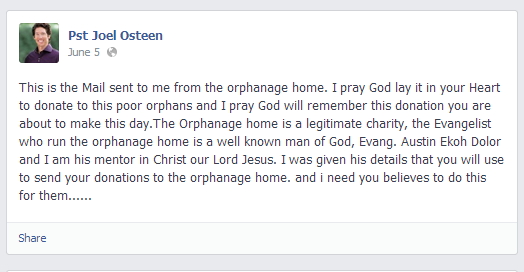
Fake Joel Osteen Facebook post
A post from a Facebook account impersonating Joel Osteen

But as the profile gains more "friends," you notice that the content changes. Now, the posts are frequently, even redundantly, about the importance of giving to charity. And the pastor starts requesting followers donate to a specific charity. When you do a search, you find that the charity doesn't exist and your pastor has another Facebook profile with 10x the number of friends. The account you followed was a scam. 

The latest trend in Facebook scams is for con artists to impersonate popular religious figures. Once they gain a following, scammers use their influence to drive donations to fake charities. The "pastor" then pockets the funds raised. (Above is a post from a scammer impersonating Joel Osteen and asking for donations.)

How can you avoid these scams? Do a quick search on Facebook before you "friend" a public figure to make sure you have the correct account. The number of friends/likes is a giveaway. Also, always check out a charity before you donate. BBB Wise Giving Alliance is a great place to start.   
 
I Spotted a Fake Facebook Account. What Should I Do?  
  • Don't share, like or comment on the posts. That just perpetuates Facebook spam.
  • Be sure to report fake profiles to Facebook following these instructions.

Wednesday, May 22, 2013

How Doing a Favor for an Unknown Caller Can Cost You


Consumers are reporting a resurgence in a classic phone scam. Victims who fall for this con allow an unknown caller to run up their phone bills without their knowledge. 
  
How the Scam Works:   

You receive a collect call and accept the charges. When caller comes on the line, it's clear you don't know him. But he begs you not to hang up. He claims that he has been arrested for a minor violation and is trying to reach his family. Unfortunately,he's dialed the wrong number and will only be allowed one phone call.  
 
The caller asks you to help him by forwarding his call. He instructs you to dial *72 and the phone number he needs to reach. You dial the numbers, thinking you are doing him a small favor. But you really just allowed the scammer to bill unlimited collect phone calls to your account. 
 
The *72 code causes all your subsequent incoming calls to be forwarded. The scammer can make collect calls to your number and have them automatically forwarded to the person he wants to reach. Even though you aren't answering the calls, the charges will still be billed to your account. You may not realize this has happened until you receive your next phone bill.

The scam is most frequently used by inmates looking for a way to make "free" collect calls. But identity thieves can use this technique to "steal" your phone number. They set up your number to forward to themselves and answer when your bank calls to check up on suspicious charges/withdrawals.  

How to Spot a Scam:

Protect yourself from call forwarding scams by following these tips: 
  • Place a collect call block on your account. If you don't need to make or accept collect calls, telephone service providers often allow you to block them for free. 
  • If you receive unwanted calls from a nearby correctional facility, contact them directly and request that your number be blocked.
  • Read your telephone bills carefully. Watch for any unusual charges.
  • Pay attention to your phone's ringing. If your phone frequently rings only once or is not ringing at all, this could be an indication that your line has been forwarded.
  • If you believe your phone is being forwarded, dial *73 or #73 to deactivate 


Scam Alert -- How Doing a Favor for an Unknown Caller Can Cost You - morganservice.net@gmail.com - Gmail

Thursday, May 16, 2013

Scammers Use Launch of Affordable Care Act Insurance for ID Theft Con

Consumers nationwide are reporting receiving scam phone calls claiming they are eligible for health insurance cards through the Affordable Care Act. But the insurance is not available until October, so don't let scammers tell you otherwise.
  
How the Scam Works:   

You receive a call from someone claiming to be from the federal government. The caller informs you that you've been selected as part of the initial group of Americans to receive insurance cards through the new Affordable Care Act. However, before he/she can mail your card, the caller needs to collect some personal information, such as bank account and social security numbers. 
 
Of course, it's a scam. There is no card, and enrollment for insurance under the Affordable Care Act doesn't start until October 1st. Sharing personal information with a scammer puts you at risk for identity theft. Scammers can use the info they obtain to open credit cards in your name or steal from your bank account. 

How to Spot a Scam:

Scammers often pose as government workers and take advantage of the confusion surrounding new or complex policies. Here are tips for dealing with this type of scam.
  • Hang up, don't press any buttons and don't call the scammer back. We all like to have the last word, but returning the phone call may just give the con artist information he can use.
  • The government typically doesn't call, text or email.  Government agencies normally  communicate through the mail, so be very cautious of any unsolicited calls, text messages or emails you receive. Also, if the government is contacting you, they should already have your basic personal info, such as address and social security number. 
  • Don't trust caller ID. Scammers have technology that lets them display any number or organization name on your screen.
  • Never give out personal information such as credit card numbers, bank account numbers, dates of birth or social security numbers to unfamiliar callers.

Thursday, May 9, 2013

WARNING! Phone/Mystery Shopper Scam

A fraudulent Canadian company is calling businesses and citizens using the Decision Analyst and Contractor Advisory Board® name, to collect email addresses to mail counterfeit checks for thousands of dollars by instructing you to deposit the check and then wire part of the money back to them. The company falsely claims the money you wire will go towards your training to become a mystery shopper. This is a criminal and illegal scam. Do not attempt to cash or deposit the check. Do not wire any money to anyone. Membership in Contractor Advisory Board® survey panel is always free.
If you have received a letter or email with similar information to the one described above, the Council of American Survey Research Organizations (CASRO) recommends the following:

  • DO NOT attempt to cash or deposit the check (if the check has already been deposited, you should alert your bank immediately).
  • DO NOT send any money to Western Union or Money Gram.
  • Contact your local post office, your state consumer protection agency (Visit www.naag.org for a list of state Attorneys Generals in the United States or visit http://www.rcmp-grc.gc.ca/scams-fraudes/index-eng.htm for Canadian Fraud Scam-Prevention), and/or your local Western Union or Money Gram office.
  • Consider filing a complaint to the FTC via its website .


WARNING! Phone/Mystery Shopper Scam | Contractor Advisory Board

Thursday, May 2, 2013

How to Protect Yourself After a Hacking Attack

Last weekend, the daily deals service LivingSocial announced that its database had been hacked, granting the cyber intruder access to the e-mail addresses, encrypted passwords and birth dates of more than 50 million users worldwide. 

This is only the latest of many recent hacks. With customer data breaches becoming increasingly common, what should you do to protect yourself? Start with our tips below:  

Protecting Yourself from Hacking:   

The best way to safeguard your personal information is by creating strong passwords and using a unique password for each website. 

What to Do After a Hack:

It happens. Even the most conscientious businesses get hacked. If a company with which you've done business suffered a security breach, follow the tips below to protect yourself. 
  • Change your password on the affected website -- and anywhere else you use it. Many web users have a rotation of passwords they use, so be sure to change yours on all appropriate websites.
  • Be extra suspicious of any emails coming from the business that was hacked -- especially ones containing links or attachments. Scammers often use the personal information they've obtained along with the hacked business' name to trick customers into sharing credit card or banking info. 
  • However, affected business do often communicate with customers after the hack. Be sure these emails are real by hovering over the links in the message. When you do this, the link destination should appear in a pop up box or in the lower left hand corner of your browser. 
  • Keep a close eye on your credit card and bank accounts. If hackers have access to your personal data, identity theft is a risk. Call your bank or credit card company immediately if you see any unexpected activity.

Sunday, April 14, 2013

Credit union warns not to respond to scam texts

AllSouth Federal Credit Union has issued a scam warning after some people in the Midlands received text messages recently claiming to be from the financial institution.
"This is a scam," said Audrey Brown, AllSouth Vice President of Marketing.  "Do not respond to these texts."
Brown said AllSouth will never ask customers for their personal information via text or email.
"AllSouth did not send this message and anyone who receives the message should not respond to it or call any of the numbers listed in it," said Brown.
The texts advise a person to call a phone number to unblock an account. Once calling the number, people are asked to enter their debit or credit card numbers and other personal information such as a Social Security Number.
People who do not have accounts with AllSouth say they have received the texts.
Brown said the credit union first learned about the suspicious texts from people who have cell phone service through AT&T, but eventually customers of Verizon and Sprint also reported receiving the text messages.
Brown said the credit union has not been hacked, and customers' banking information is safe.  The company is working with its security advisors to monitor the situation.
"The proper authorities have been notified regarding this," said Brown.
If you received one of these text messages, called the number and provided your financial information, you can contact AllSouth at security@allsouth.org.
For more information go to www.allsouth.org.


Credit union warns not to respond to scam texts - wistv.com - Columbia, South Carolina |

Saturday, January 26, 2013

Top Ten Scams of 2012

Top Overpayment/Fake Check Scam: Car Ads

The online ad says something like “Get Paid Just for Driving Around” – a prominent company is offering $400+ per week if you’ll drive around with their logo all over your car. They send a check to you, which you are supposed to deposit in your account and then wire part of the payment to the graphic designer who will customize the ad for your vehicle. Whoops! A week later, the check bounces, the graphic designer is nowhere to be found, and you are out the money you wired. The Internet Complaint Center (www.ic3.gov) says they saw this one a lot in 2012.


Top Emergency Scam: Grandparents Scam

The “Grandparents Scam” has been around a while, but it’s still so prevalent we need to mention it again: grandchild/niece/nephew/friend is traveling abroad and calls/texts/emails to say he or she has been mugged/arrested/hurt and needs money right away (“…and please don’t tell mom and dad!”). Plus the FBI says that, thanks to social media, it’s getting easier and easier for scammers to tell a more plausible story because they can use real facts from the supposed victim’s life (“Remember that great camera I got for Christmas?” “I’m in France to visit my old college roommate.”). Easy rule of thumb – before you wire money in an emergency, check with the supposed victim or their family members to make sure they really are traveling. Odds are they are safe at home.


Top Employment Scam: Mystery Shopping

If you love to shop, working as a secret shopper may sound like an ideal way to supplement your income. But scammers have figured that out, too, and many job offers are nothing more than a variation on the Overpayment/Fake Check Scam (above). Sometimes they even tell you that evaluating the wire service company is part of the job, which is why you need to send back part of the money. The Mystery Shopping Providers Association says it’s not the practice of their members to pre-pay shoppers, but if you have your heart set on this type of job, you can find a legitimate gig through their website at www.mysteryshop.org.

Top Advance Fee/Prepayment Scam: Nonexistent Loans

Loan scams continued to fester in 2012. It seems for every legitimate lender out there, there is a scammer waiting to prey on people in desperate situations. Most of the scams advertise online and promise things like no credit check or easy repayment terms. Then the hook: you have to make the first payment upfront, you have to buy an “insurance policy,” or there is some other kind of fee that you have to pay first to “secure” the loan. This year, we heard a new, aggressive twist on loan scams: consumers who were threatened with lawsuits and law enforcement action if they didn’t “pay back” loans they said they had never even taken out in the first place. Some got calls at their workplace, even to relatives. The embarrassment of being thought of as a delinquent caused some victims to pay even when they knew they didn’t owe the money.


Top Phishing Scam: President Obama Will Pay Your Utility Bills

Of all the politically-related scams, this one seemed to be the most prevalent. At the peak of summer with utility costs soaring, consumers got emails, letters and even door-to-door solicitations about a “new government program” to pay your utility bills. Hey, the president wants to get re-elected, right? Maybe he’s just trying to win votes. Victims “registered” with an official-looking website and provided everything scammers needed for identity theft purposes, including bank account information.


Top Sweepstakes/Lottery Scam: Jamaican Phone Lottery

This is an old one that flared up again this year. We consider it flattering (in a weird way) that BBB is such a trusted brand that we “star” in so many scams! In this one, the calls come from Jamaica (area code 876) but the person claims to represent BBB (or FBI, or other trusted group). Great news: you’ve won a terrific prize (typical haul: $2 million and Mercedes Benz) but you have to pay a fee in order to collect your winnings. There are lots of variations on this; sometimes it’s a government grant. Best just to hang up and then file a phone fraud report with the appropriate government agency (see below).


Top Identity Theft Scam: Fake Facebook Tweets

Two top social media sites were exploited in one of this year’s top scams. You get a Direct Message from a friend on Twitter with something about a video of you on Facebook (“ROFL they was taping you” or “What RU doing in this FB vid?” are typical tweets). In a panic, you click on the link to see what the embarrassing video could possibly be, and you get an error message that says you need to update Flash or other video player. But the file isn’t a new version of Flash; it’s a virus or malware that can steal confidential information from your computer or smart phone. Twitter recommends reporting such spam, resetting your password and revoking connections to third-party applications.


Top Home Improvement Scam: Sandy “Storm Chasers”

BBB spends a lot of time investigating and reporting on home improvement scams, but this year we saw an unusual amount of “storm chaser” activity following Super Storm Sandy. Tree removal, roofing, general home repairs – some were legitimate contractors who came from other areas for the volume of work available; others were unlicensed, uninsured and ill-prepared for the work; while some were even out-and-out scam artists who took the money and never did the work. In an emergency, it’s tempting to skip reference checking, but that’s never a good idea. BBB has tens of thousands of Accredited Businesses in the home contracting field who are committed to upholding our mission of trust. Next time you need home repairs, find a contractor at www.bbb.org/search.


Top Sales/Rental Scam: Real Stars, Fake Goods

Sports memorabilia and phony tickets always make the list of top counterfeit goods. From the Super Bowl to the World Series, counterfeiters manage to have their hands in your pocket all year long. With the London Olympics added to the mix, it appears that 2012 was a good year for sports fakes. Some scammers were selling cheap knock-offs in front of stadiums. Others set up websites that just stole your money and never had any goods to begin with. Counterfeit goods are not only a rip-off for you because the merchandise is usually shoddy, but they are also a rip-off for the teams, athletes, designers and artists who create, license and sell the real thing. Buy directly from team stores and websites, or from legitimate retailers. You’ll pay a little more, but it will be the real deal. Remember, if a deal sounds too good to be true, it probably is.


Scam of the Year: Newtown Charity Scams

Within hours of the horrific shooting at Sandy Hook Elementary School in Newtown, Connecticut, social media pages dedicated to the child victims began cropping up…and some of them were scams asking for money. The FBI has already arrested one woman for posing as the aunt of one of the children killed, and state and federal agencies are investigating other possible fraudulent and misleading solicitations. In response to these reports, BBB Wise Giving Alliance offered tips for donors to understand how and when to best support those dealing with such a tragic crisis. Although the number of people defrauded and the total dollars stolen is most likely low, the cynicism and sheer audacity of these scams merits our selecting it as the “Top Scam of 2012.”


More information for consumers:

For more information on these and other scams, go to BBB Scamstopper. Sign up for our Scam Alerts and learn about new scams as soon as we do.
To search for a business in the U.S. or Canada, or to find your local BBB, go to BBB.org.
For information on charities, go to Give.org.
For information on U.S. government services, go to: USA.gov.
For information on Canadian government services, go to Service Canada.

Better Business Bureau Names “Top Ten Scams” of 2012 - BBB News Center

Friday, January 25, 2013

New Wave of Phishing Scams Uses Facebook Info for Personalized Spam

New Wave of Phishing Scams Uses
 Facebook Info for Personalized Spam


Check your privacy settings. Scammers are tapping into the personal data available through Facebook, Google+ and LinkedIn to pose as your friends in fraudulent emails. Watch out for these personalized scam messages and take steps to prevent them. 
 
How the Scam Works:

You receive an email that appears to be sent by a friend or family member. The message addresses you by name, but the content is strange. Usually, it's just a link to a website. If you click on it, you could end up downloading malware to your computer. 
 
What's going on here? The scammers are exploiting the fact that you're more likely to click on a link if it was sent by a friend. 
 
Scammers find your information through Facebook or other social media accounts. Some set up fake accounts and send out friend requests. When you accept the request, they can view your friends and personal and contact information. Other scammers rely on social media users not locking down their privacy settings, so basic information, such as your name, email address and friends' names, is publicly available. 
 
How to Protect Your Facebook Account from Spammers?   
  • Review your security settings. Check out Facebook's information on setting your privacy settings to be sure you aren't sharing personal information with strangers. Look here for information on what can be found publicly in search engines. 
  • Don't accept Facebook friend requests from unknown people.  
  • Report scam profiles and other suspicious activity to Facebook by following these instructions
  • Consider enabling login notifications, so you will know when someone uses a new device to access your account.
  • When accessing Facebook from public wi-fi in places like hotels and airports, text "otp" to 32665 to receive a one-time password to your account.
 What to do if You Receive a Suspicious Email:  
  • Don't click on strange links, even if they're from friends. Notify the person who sent you the email if you see something suspicious.
  • Check the "header" field. Even though a friend's name is in the "from" field, spam email won't be from their email address. 
  • If you click the link, be sure to run a virus scan on your computer.  
For More Information
  
Visit Facebook's privacy section for more information about protecting your account.